
Reconciling bank accounts monthly in Brief Accounting is imperative to ensure that an accurate bank balance is reflected in the books. The bank reconciliation reports the difference between the ending balance on the bank statement and the ending balance in Brief Accounting. A bank reconciliation consists of:
- outstanding checks (i.e. posted in Brief Accounting but have not cleared the bank)
- outstanding receipts (i.e. posted in Brief Accounting but have not cleared the bank)
- bank errors (errors made my bank that will be corrected in subsequent month)
- summary of withdrawals and deposits for the month
Below is an example bank reconciliation using the statement below as a reference:
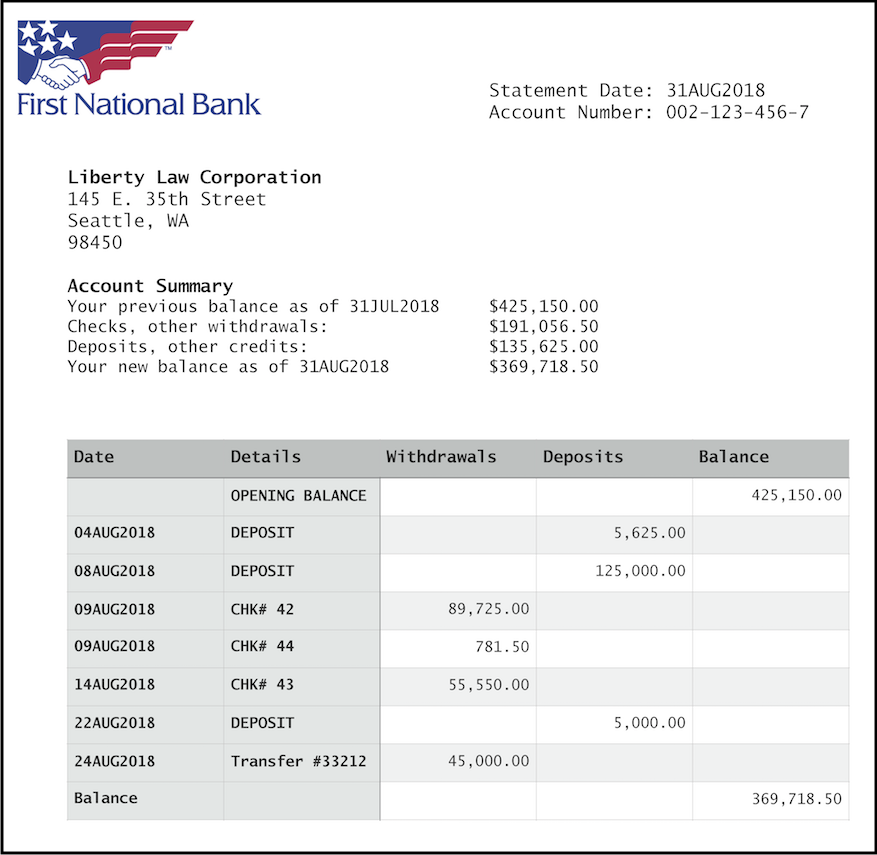
Assuming that all transactions have been posted in Brief Accounting for the month being reconciled, proceed with clearing checks and receipts in Brief Accounting.
Clearing Receipts:
Select the Bank Rec module > Clear Receipts tab:

Enter the bank account number as well as the month of the bank reconciliaiton and click OK:

TIP: Enter T or G in the Account field and hit the "tab" key to view a list of all Trust or General bank accounts.
A list of receipts for the month are displayed:

Looking at the bank statement, click in the "Clear" column beside each of the receipts that appear on the bank statement. Once selected, click the "Clear" button at the bottom:

The cleared transactions will disappear from the screen once cleared (this can be undone if required - see Unclearing Transactions section).
Clearing Checks:
Select the Bank Rec module > Clear Checks tab:

Enter the bank account number as well as the month of the bank reconciliaiton and click OK:
A list of checks for the month are displayed:

Looking at the bank statement, click in the "Clear" column beside each of the checks that appear on the bank statement. Once selected, click the "Clear" button at the bottom:

The cleared transactions will disappear from the screen once cleared (this can be undone if required - see Unclearing Transactions section).

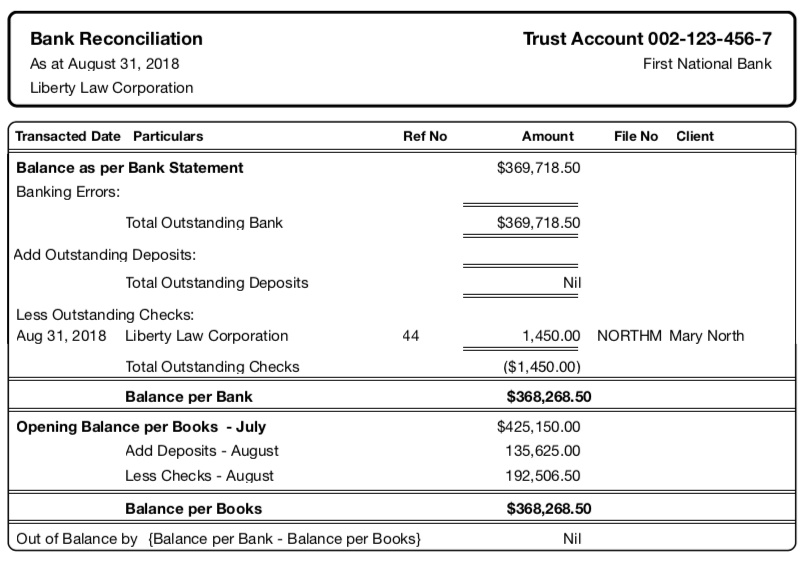
NOTE: Notice the August 31 check was NOT cleared with the August transactions. Since it did not appear on the August Bank Statement, it will be left outstanding until the subsequent month in which it appears on the bank statement. It will be marked as cleared as part of the bank reconciliation for that month.
Printing a Bank Reconciliation:
Once the checks and receipts have been marked as cleared as above, click the Print icon to print the reconciliation:

A dialog box is displayed in which the ending balance as per the bank statement must be entered. After entering the balance, click the "tab" keyboard key. Immediately it is displayed as "In Balance" or if not in balance, the amount in which it is out:

If it is In Balance, click Print. If it is out of balance, click Cancel (see Trouble-Shooting section below).
The printed Bank Reconciliation displays any outstanding transactions as well as a summary of the deposits and withdrawals:
Trouble-shooting Bank Reconciliations:
Click here for trouble-shooting an out-of-balance bank reconciliation.When bank rec is not in balance.
0 Comments