
Time Codes are abbreviations assigned to a Time Activity to automate data entry. The Description, Hours, GL Account and applicable taxes (if any) can be set according to defined activity code defaults.
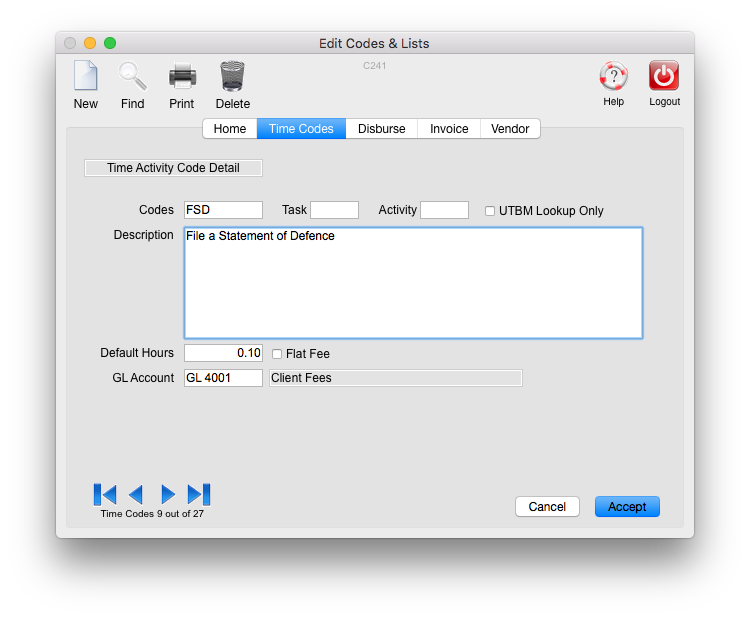
For example, the code "fsc" might represent File a Statement of Claim, and represent a default value of 0.01 hours, affecting GL account 4001 (Fees):

Viewing Time Codes:
Select the Lists module icon > Time Codes tab:

A list of Time Codes is displayed:

Edit a Time Code:
Double-click on a a Time Code from the list displayed. This opens the detail.
Edit the information and click Accept.
Note: To delete a time code, single click on the Time Code to highlight it in the list, then click the "Delete" icon:

Enter a New Time Code:
From the Time Codes list, click the "New" icon:

Enter a short code to be used (can be up to 8 characters), description, default hours (if wanted) and General Ledger Account (usually Fees GL). Codes may be up to 8 characters in length:
Click Accept when finished.
Note: The Description is the only mandatory field on codes.
When a code is used on a given time slip, the default description from the code may be edited or added to, and the default hours may be changed on a given slip.
0 Comments