
A Trust Journal displays a list of transactions (from a single Trust Bank Account) for a given month or for a specified date range.
From the Brief Accounting Home screen, select the Trust module icon > Journal tab for the Trust Account.
A list of each month with a summary of total Checks, Receipts and month-end balance is displayed:

Double-click on the month to be viewed/printed.
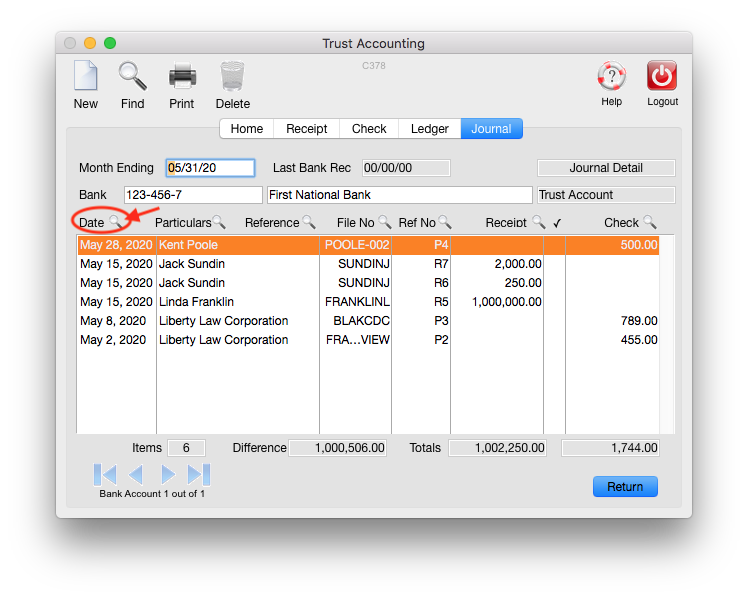
A detailed list of all checks and receipts for the month is displayed:

Click the Print icon.
Select a Journal printing option and click Print:

- Receipts Journal (prints only receipts)
- Check Register (prints only checks)
- Combined Journal (prints checks and receipts)
- Transfer Journal (prints a list of transfers made between different matters in the same trust bank account)
Note: Selecting the "GL Detail" option details the Debit and Credit GL Accounts for each transaction.
The report can be printed to:
- Printer
- Screen
- File (Excel file)
TIP: To print a date range of transactions that do not fall within a single calendar month:
From the screen with the detailed transactions, click the magnifying glass icon beside the Date column heading:
Enter the date range of transactions to view and click Search:

With the date range of transactions displayed, proceed to print as above.
0 Comments